Upsherin invitations — pick a design, add the details, send
The boy turns three; the card carries his name, the Hebrew date of the upsherin, the place and the time. Pick a design, write the lines, send the link to the family.
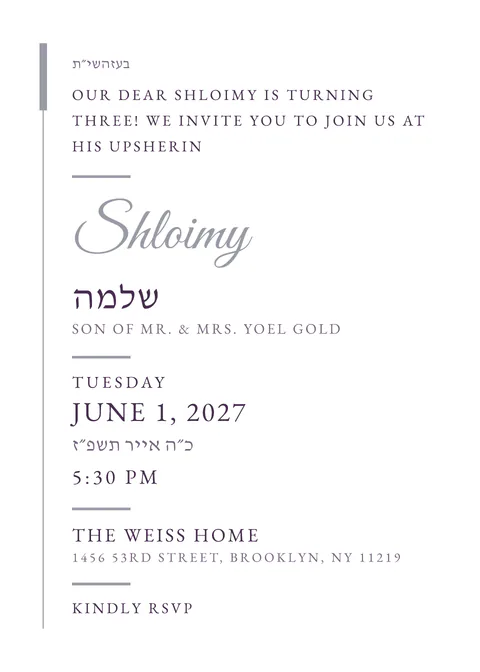
The standard upsherin wording with the boy’s Hebrew name and his parents, in Lashon Kodesh or English.
Type the date of the upsherin and the card prints the Hebrew date with the parsha; an upsherin held the evening before carries the right Hebrew day.
An upsherin list is short; the free plan covers it, reply form on or off.
An upsherin card is a small card for a small simcha: the boy, the date, the place. The designs here keep the words few and the picture warm — a lion, scissors, soft blues — with no photographs of people.
Send the link to the family group; each family can reply with how many are coming, or you can switch the reply off and let the link carry the address and the time only.
Questions
Does the card show the Hebrew date of the upsherin?
Yes. The Hebrew date and the parsha are filled in from the date you type, with the after-sunset rule for an evening upsherin.
Can I write it in Yiddish?
Yes. Write the card in Lashon Kodesh, Yiddish or English; the buttons and the reply form follow the language.
Is it free?
Yes. Up to 40 households on the free plan, with every standard design, the envelope, music, maps and the reply form.
How do guests reply?
Every family gets its own link, with their name on the envelope. The reply is two taps: coming or not, and how many seats. You see who opened and who answered, and the list exports as a spreadsheet for the hall. You can also switch the reply form off and use the link for directions only.
Does it work on a filtered phone?
The card is readable before any animation runs; the schedule, the maps, the calendar buttons and the reply form work without JavaScript, and a plain text version is one tap away. The message you send carries the names, the date and the hall as text before the link, so a guest whose phone shows no pictures still has the details.
Do my guests need an app or an account?
No. They tap the link in WhatsApp or email and the invitation opens in the browser, on any phone, tablet or computer. Only the host signs in, with an email — no password.
All upsherin designs in the gallery · All 72 designs · Pricing